Вариант А1
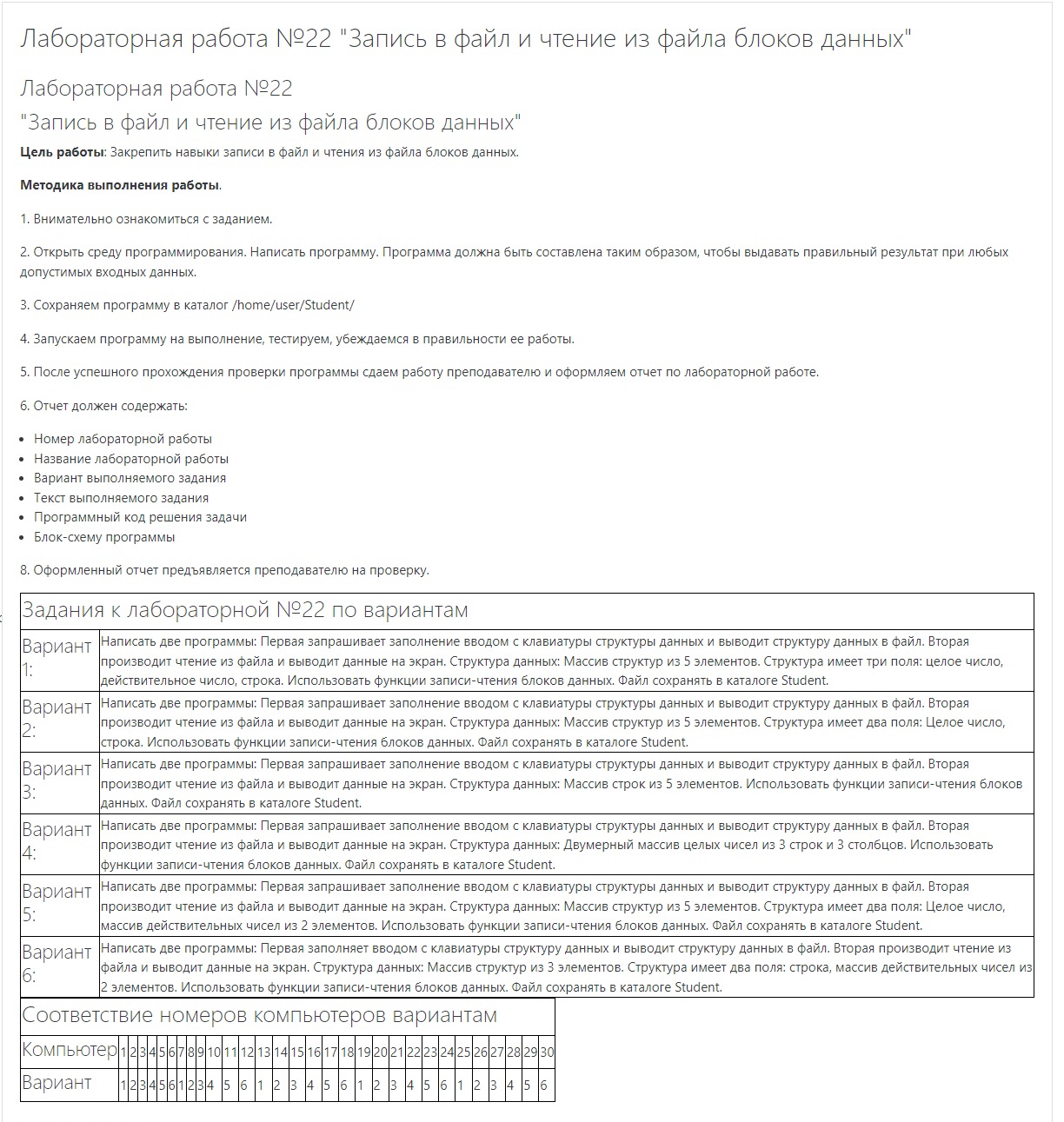
Написать две программы: Первая запрашивает заполнение вводом с клавиатуры структуры данных и выводит структуру данных в файл. Вторая производит чтение из файла и выводит данные на экран. Структура данных: Массив структур из 5 элементов. Структура имеет три поля: целое число, действительное число, строка. Использовать функции записи-чтения блоков данных. Файл сохранять в каталоге Student.
Первая программа
// Вариант А1 (Первая программа)
#include <stdlib.h>
#include <stdio.h>
#define f_path "../test_block.dat"

int main() {
  int i;
  FILE* fil;
  struct structur {
    int chislo;
    float fchislo;
    char stroka[50];
  };
  structur stur[5];

  fil = fopen(f_path, "w");
  if (fil == NULL) {
    printf("\nError open file to write\n");
    return -1;
  } printf("File open to write\n");

  for (i = 0; i < 5; i++) {
    printf("\nchislo ");
    scanf("%d", &stur[i].chislo);
    printf("\nfchislo ");
    scanf("%f", &stur[i].fchislo);
    printf("\nstroka ");
    scanf("%s", &stur[i].stroka);
  }
  fwrite(stur, sizeof(stur), 1, fil);
  printf("Write OK\n");
  i = fclose(fil);
  if (i != 0) {
    printf("Error close file\n");
    return -1;
  } printf(File closed\n);
}
Вторая программа
// Вариант А1 (Вторая программа)
#include <stdlib.h>
#include <stdio.h>
#define f_path "../test_block.dat"

int main() {
  int i = 0;
  char cc[100] = "cat ";
  FILE* fil;
  struct structur {
    int chislo;
    float fchislo;
    char stroka[50];
  };
  structur stur[5];
  structur stur_all[5];

  fil = fopen(f_path, "r");
  if (fil == NULL) {
    printf("Error open file to read\n");
    return -1;
  } printf("Open file to read\n");
  fseek(fil, 0, SEEK_SET);

  while (fread(&stur[i], sizeof(stur[i]), 1, fil) == 1) {
    printf("stur[%i]=%i\n", i, stur[i].chislo);
    printf("stur[%i]=%f\n", i, stur[i].fchislo);
    printf("stur[%i]=%s\n", i, stur[i].stroka);
    i++;
  }

  fseek(fil, 0, SEEK_SET);
  fread(stur_all, sizeof(stur_all), 1, fil);
  for (i = 0; i < 5; i++) {
    printf("stur_all[%i]=%i\n", i, stur_all[i].chislo);
    printf("stur_all[%i]=%f\n", i, stur_all[i].fchislo);
    printf("stur_all[%i]=%s\n", i, stur_all[i].stroka);
  } printf("File read OK\n");
  i = fclose(fil);
  if (i != 0) {
    printf("\nError close file\n");
    return -1;
  } printf("File closed\n");
  strcat(cc, f_path);
  system(cc);
  printf("\nSystem read OK\n");
}
Вариант А3
Написать две программы: Первая запрашивает заполнение вводом с клавиатуры структуры данных и выводит структуру данных в файл. Вторая производит чтение из файла и выводит данные на экран. Структура данных: Массив строк из 5 элементов. Использовать функции записи-чтения блоков данных. Файл сохранять в каталоге Student.
Первая программа
// Вариант А3 (Первая программа)
#include <stdlib.h>
#include <stdio.h>
#include <string.h>
#define f_path "../block.dat"

char string1[5][30];
int count = 0;

int main() {
  int i;
  FILE* fil;
  fil = fopen(f_path, "w");
  if (fil == NULL) {
    printf("Error open file to write\n");
    return -1;
  } printf("File open to write\n");

  for (i = 0; i < 5; i++) {
    printf("\n%i: ", i);
    scanf("%s", string1[i]);
  }

  fwrite(string1, sizeof(string1), 1, fil);
  printf("Write OK\n");

  i = fclose(fil);
  if (i != 0) {
    printf("Error close file\n");
  } printf("File closed");
}
Вторая программа
// Вариант А3 (Вторая программа)
#include <stdlib.h>
#include <stdio.h>
#include <string.h>
#define f_path "../block.dat"

char string1[5][30];

int main() {
  char cc[100] = "cat ";
  int i;
  FILE* fil;
  fil = fopen(f_path, "r");
  if (fil == NULL) {
    printf("Error open file to read\n");
    return -1;
  } printf("File open to read\n");

  fread(string1, sizeof(string1), 1, fil);
  for (i = 0; i < 5; i++) {
    printf("string1[%i]=%s \n", i, string1[i]);
  } printf("File read OK\n");

  i = fclose(fil);
  if (i!=0) {
    printf("\nError close file\n");
    return -1;
  } printf("\nFile closed\n");

  strcat(cc, f_path);
  system(cc);
  printf("\nSystem read OK\n");
}
Вариант А6
Написать две программы: Первая заполняет вводом с клавиатуры структуру данных и выводит структуру данных в файл. Вторая производит чтение из файла и выводит данные на экран. Структура данных: Массив структур из 3 элементов. Структура имеет два поля: строка, массив действительных чисел из 2 элементов. Использовать функции записи-чтения блоков данных. Файл сохранять в каталоге Student.
Первая программа
// Вариант А6 (Первая программа)
#include <stdlib.h>
#include <stdio.h>
#include <string.h>
#define f_path "../block.dat"

int main() {
  int i = 0, j = 0;
  FILE* fil;
  struct laboratornaya {
    float a[2];
    char stroka[30];
  };
  laboratornaya lab[3];
  fil = fopen(f_path, "w");
  if (fil == NULL) {
    printf("Error open file to write\n");
    return -1;
  } printf("File open to write\n");

  for (i = 0; i < 3; i++) {
    printf("vvedite stroku: ");
    scanf("%s ", lab[i].stroka);
    for (j = 0; j < 2; j++) {
      printf("vvedite massiv: ");
      scanf("%f", &lab[i].a[j]);
    }
  } fwrite(lab, sizeof(lab), 1, fil);
  printf("Write OK\n");

  i = fclose(fil);
  if (i!=0) {
    printf("Error close file\n");
    return -1;
  } printf("File closed\n");
}
Вторая программа
// Вариант А6 (Вторая программа)
#include <stdlib.h>
#include <stdio.h>
#include <string.h>
#define f_path "../block.dat"

int main() {
  FILE* fil;
  struct laboratornaya {
    float a[2];
    char stroka[30];
  };
  laboratornaya lab[3];
  int i = 0, j;
  fil = fopen(f_path, "r");

  if (fil == NULL) {
    printf("Error open file to read\n");
    return -1;
  } printf("File open to read\n");

while(fread(&lab[i], sizeof(lab[i],1,fil)==1) {
    printf("%s\n", lab[i].stroka);
    for (j = 0; j < 2; j++) {
      printf("%f\n", lab[i].a[j]);
    }
    i++;
}
printf("\nRead OK\n");
i=fclose(fil);
if(i!=0) {
    printf("Error close file\n");
    return -1;
} printf("\nFile closed\n");

}